Chat Application diagram template
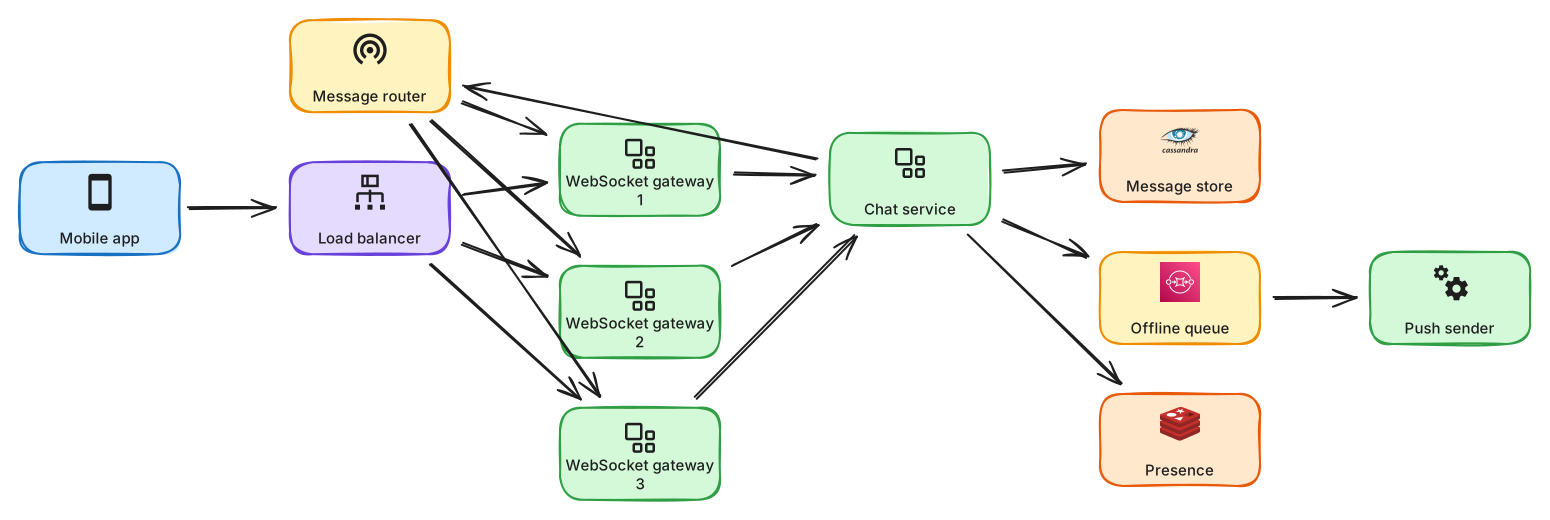
Real-time chat with WebSocket gateways, a message store, presence and offline push.
About this design
A chat system has two very different jobs: keep millions of open connections alive, and keep every message safely ordered and stored. The diagram separates them. Stateful WebSocket gateways hold the connections and do nothing smart; a stateless chat service validates, sequences and persists each message to a wide-column store that scales for append-heavy writes. A pub/sub layer routes a message from the sender's gateway to the gateway holding the recipient's socket, and a presence service tracks who is online with short expiring keys. If the recipient is offline the message still lands in the store and a push notification goes out through a mobile provider. Walk through group chats, where fan-out grows with membership, read receipts, and the choice between per-conversation ordering and a global clock. Connection draining during deploys is the operational detail worth mentioning.
Diagram as text
This is the source of the diagram, in the ArchBoard diagram DSL. Paste it into Tools, Diagram from text to rebuild or change it.
title "Chat application"
direction LR
mobile "Mobile app" -> lb "Load balancer" -> service ws "WebSocket gateway"
[ws x3]
ws -> service chat "Chat service"
chat -> db cassandra "Message store"
chat -> pubsub "Message router"
message-router -> ws
chat -> cache redis "Presence"
chat -> queue sqs "Offline queue" -> worker push "Push sender"